
The Footer Builder is a powerful feature of the Porto theme that allows users to create and customize footers with a user-friendly interface. Before you can start using the Footer Builder, you must ensure it is properly activated and configured. Here's a detailed guide to enable and prepare the Footer Builder for use.
Step by Step Process:
- Access the Speed Optimization Settings:
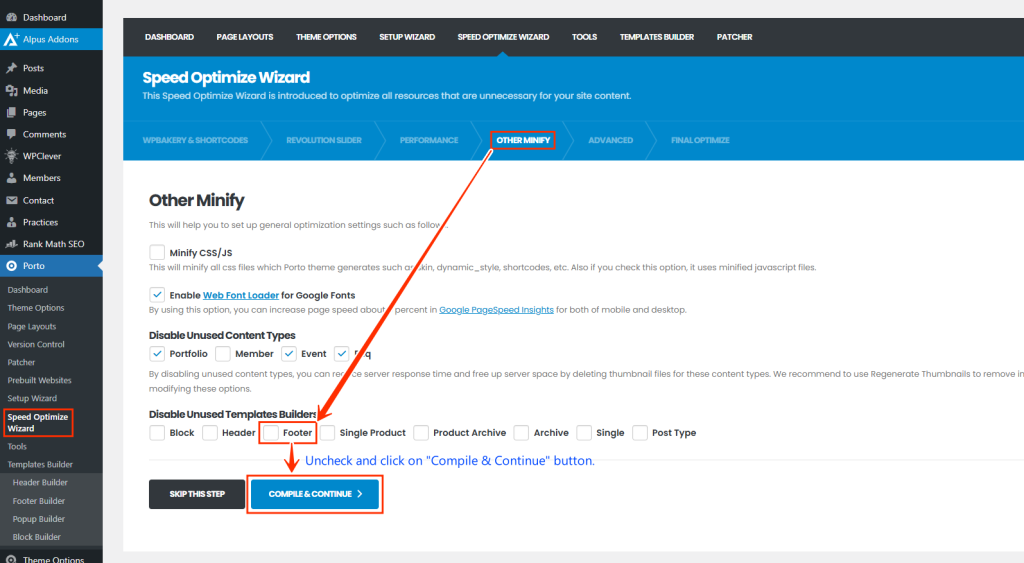
- Navigate to your WordPress dashboard and go to Porto > Speed Optimize Wizard.
- This section helps optimize your site for performance and allows you to manage key feature settings.
- Locate the Footer Builder Option:
- Within the Other Minify tab, scroll to the bottom of the page.
- Look for the option labeled Footer Builder.
- Disable Footer Builder Minification (if necessary):
- If the Footer Builder option is checked, it means the feature is currently disabled due to minification optimizations.
- To enable it, uncheck the option. This will allow the Footer Builder to function correctly without interference from minification processes.
- Save and Refresh:
- After unchecking the Footer Builder option, click the Compile & Continue button to apply the setting.
- Refresh your browser to ensure the Footer Builder is fully activated.
- Verify Activation:
- Once saved, you can confirm that the Footer Builder is active by navigating to Porto > Template Builder > Footer in your WordPress dashboard.
- You should now see the Footer Builder interface, ready for customization.
The Porto theme includes various performance optimization settings that may disable certain features by default to improve speed. Activating the Footer Builder ensures that you can fully utilize its functionality without conflicts caused by minification or optimization processes. This preparation step ensures a smooth design experience and avoids unnecessary errors when building or editing footers.
By enable the Footer Builder correctly, you unlock the full potential of Porto’s advanced customization capabilities, making it easier to create stunning, responsive, and functional footers.
