
The Horizontal Scroller feature in Porto lets you display content in a left-to-right scrolling layout rather than the traditional vertical flow.
This layout style is ideal for portfolios, featured content, timelines, storytelling sections, and other visually driven designs. You can see an example in Seo3.

Where Horizontal Scroller Is Available
Porto supports Horizontal Scroller in different ways depending on the page builder and layout mode:
WPBakery Page Builder
- Available as a dedicated element: Porto Horizontal Scroller
Elementor – Section Mode
- Available inside the Section element
- Location:
Layout Tab → Porto Additional Settings → Use As → Horizontal Scroller
Elementor – Container Mode
-
Since Section elements are not available in Container mode, Horizontal Scroller is provided as a separate element:
- Alpus Horizontal Scroller
- This element offers the same horizontal scrolling behavior while being fully compatible with Elementor’s Flexbox Container system.
How to Enable Horizontal Scroller
Elementor (Section Mode)
- Select a Section
- Open the Layout tab
- Expand Porto Additional Settings
- Set Use As to Horizontal Scroller
Elementor (Container Mode) & WPBakery
- Add the Alpus Horizontal Scroller or Porto Horizontal Scroller element
- Place your content items inside the scroller
- Configure layout and spacing options as needed

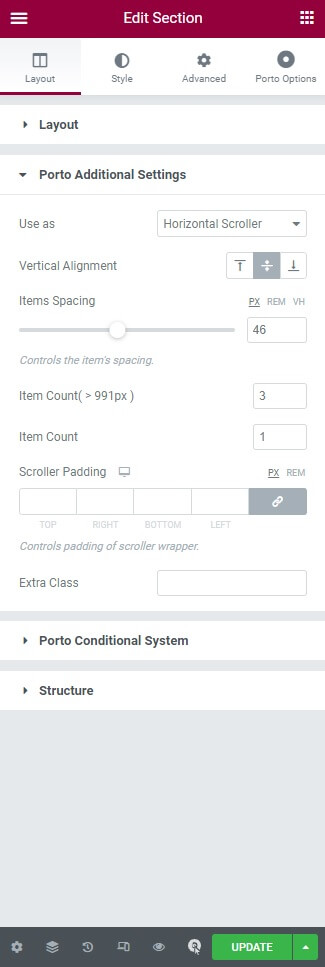
Horizontal Scroller Options
The Horizontal Scroller provides the following configuration options:
| Option | Description |
|---|---|
| Vertical Alignment | Aligns items vertically within the scrolling area |
| Items Spacing | Sets horizontal spacing between items |
| Item Count | Number of items visible at once on desktop |
| Item Count (<992px) | Number of visible items on tablets and smaller screens |
| Scroller Padding | Inner spacing around the scrolling content |
| Extra Class | Custom CSS class for advanced styling |
Common Use Cases
- Horizontal portfolios and galleries
- Feature or service showcases
- Timeline-style layouts
- Storytelling or presentation sections
- Interactive landing page components
