
When your store is under development or you’re preparing for a major launch, it’s important to let visitors know that something exciting is on the way — while keeping your backend accessible for admins. WooCommerce Coming Soon mode allows you to temporarily hide your store from public view and display a stylish Coming Soon message to your visitors.
When the Coming Soon Mode is enabled, regular visitors will see a placeholder page with a friendly message such as:
Great things are on the horizon
Something big is brewing! Our store is in the works and will be launching soon!
This is a great way to maintain professionalism while your site is still being developed or updated.
How to Enable Coming Soon Mode
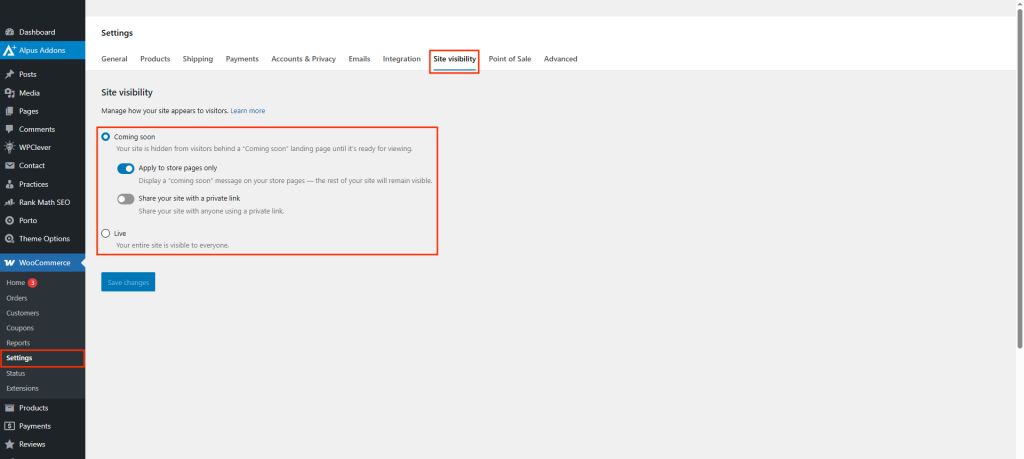
- Go to your WordPress Dashboard and navigate to: WooCommerce > Settings > Site Visibility
- Find the option labeled Coming Soon.
- Toggle the switch to Enable this feature.
- Once enabled, visitors who are not logged in will see the Coming Soon message, while site administrators will still have full access to edit, preview, and configure the store.
- Click Save Changes to apply your settings.
Additional Tips
- Perfect for pre-launch phases or maintenance periods.
- Remember to disable “Coming Soon” mode before your official store launch.
