
By default, WooCommerce displays a My Account page where users can log in to their existing accounts. However, if you want to allow new users to create an account directly from the same page, you can easily enable the User Registration option. This feature improves the user experience by combining both Login and Registration forms in one place, helping streamline customer onboarding.
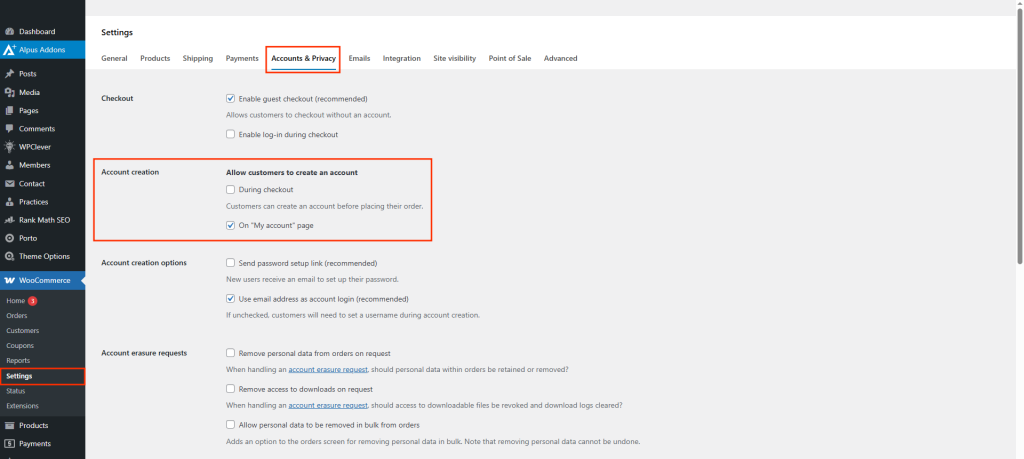
Steps to Enable User Registration on the My Account Page
- Go to your WordPress Dashboard and navigate to WooCommerce > Settings > Accounts & Privacy.
- In the Account Creation section, check the following options to allow user registration:
- Allow customers to create an account on the My Account page.
- (Optional) Allow customers to create an account during checkout.
These options let customers register either from the My Account page or during the checkout process.
- Click the Save Changes button at the bottom of the page.
- Verify the Registration Form
After saving, visit your website’s My Account page (typically located at/my-account/).
Additional Tips
- Enabling registration helps increase customer engagement and simplifies order tracking.
- Use a security plugin or CAPTCHA on the registration form to prevent spam registrations.
- You can customize the registration fields using plugins like WooCommerce Custom Registration Fields or custom code.
