
The Archive Title element in the Porto theme allows you to display the main title of any WooCommerce or WordPress archive page—such as product archives, category archives, tag archives, or custom taxonomy archives.
This element ensures that your archive pages follow a consistent and visually appealing heading structure while giving you full control over typography, alignment, and styling.
Whether you are building your shop archive using WPBakery or Elementor, the Archive Title element helps you maintain a clear page hierarchy and improve both usability and SEO.
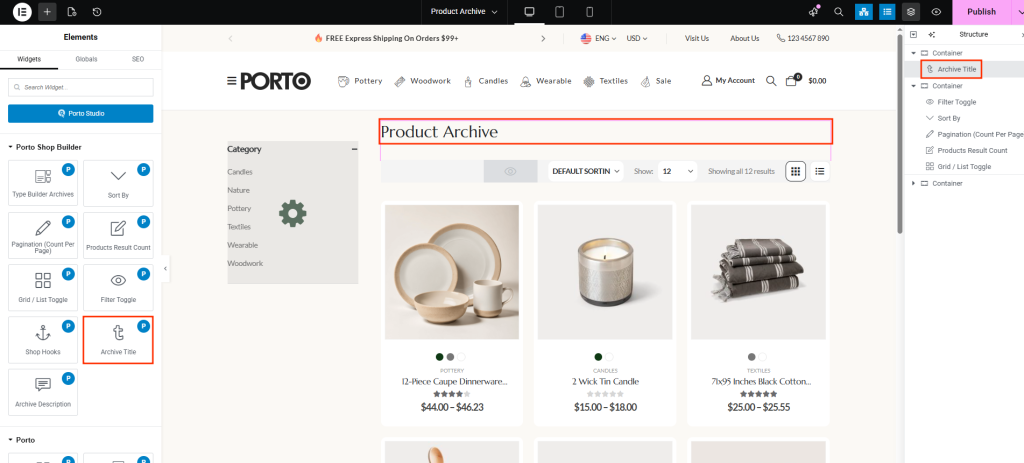
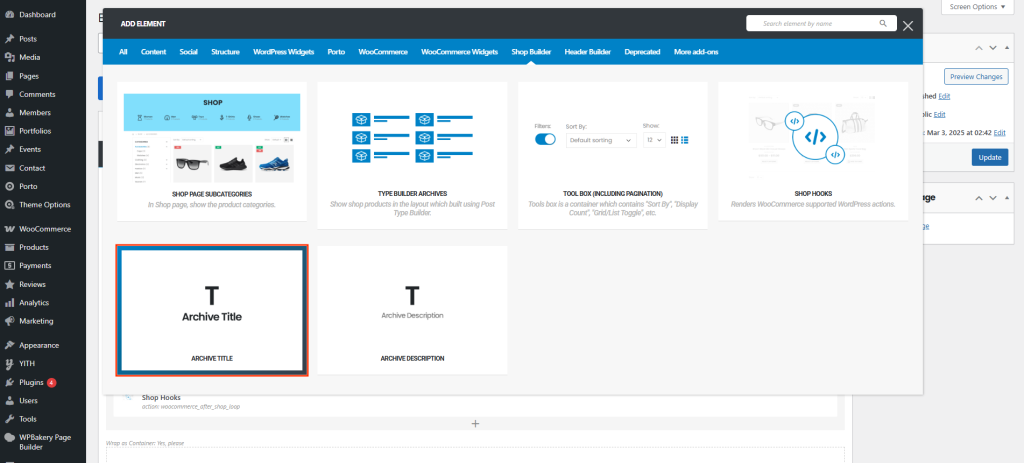
How to Use the Archive Title Element
- Open Your Archive Template
Go to Porto → Template Builder → Product Archive, and edit your archive layout using your preferred page builder. - Insert the Archive Title Element
Add the Archive Title element into your layout. This is typically placed near the top of the archive page but can be positioned anywhere depending on your design needs. - Customize the Title Appearance
Open the element’s settings panel to configure the display. You can adjust heading tags, typography, alignment, and color to match your site design. - Save and Preview
Save your template and preview your archive page to ensure the title looks exactly how you expect.
Element Content Options
| Option | Description |
|---|---|
| Title Tag | Choose the HTML heading tag (H1–H6) used for the archive title. H1 is recommended for SEO, but you may adjust it based on page structure. |
| Title Typography | Customize font size, weight, family, spacing, and overall text style to match your design system. |
| Alignment | Set the title alignment to left, center, or right, depending on your layout style. |
| Color | Choose a custom color for the archive title text for visual consistency with your theme. |
Additional Tips
- Use H1 for SEO: Setting the Archive Title to H1 helps search engines understand the main topic of the page.
- Match Your Theme Style: Use your brand’s color and typography to keep the archive page cohesive.
- Responsive Typography: Ensure fonts adapt well on mobile for readability.
- Avoid Duplicate Titles: Do not add additional heading elements around the archive title to prevent redundancy.
