
The Porto Social Icons Element is an essential part of any modern website header or footer. It provides a stylish way to display links to your social media profiles, helping you connect with your audience across multiple platforms.
Fully customizable and responsive, this element supports multiple design styles, allowing you to easily match your brand’s visual identity. Whether you want a clean minimalist look or vibrant hover effects, the Porto Social Icons Element gives you the flexibility to achieve your desired result.
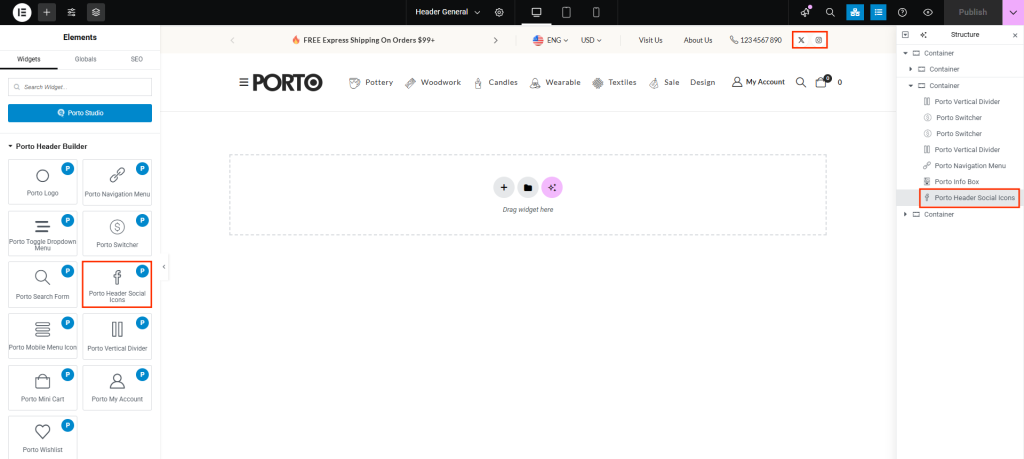
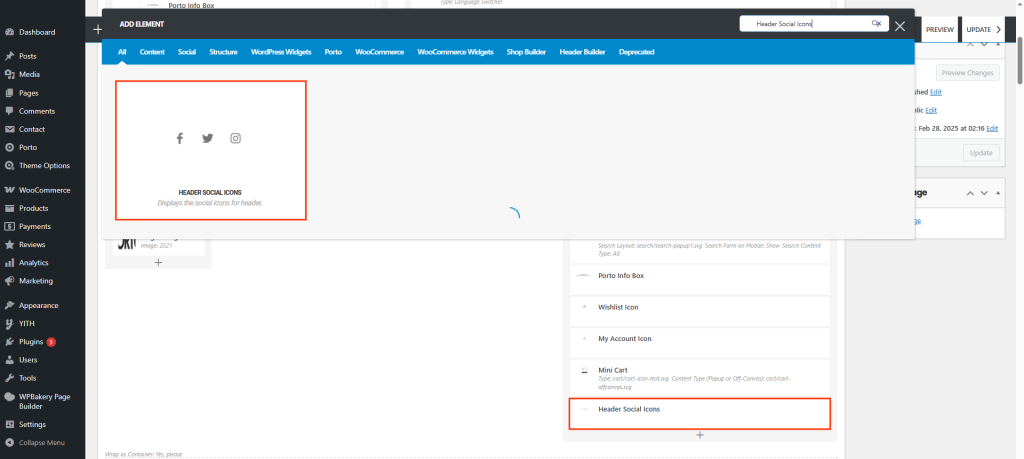
How to Use the Porto Social Icons Element
- Create or choose the column where you want to add your element. Click Add New Element.
- From the element list, select Porto Social Icons Element.
- Place the element within your header, footer, or sidebar area.
- Configure the icons’ design, layout, and spacing using the element’s settings.
- Save your changes and preview your page.
Element Content Options
| Option | Description |
|---|---|
| Icon Font Size | Adjust the size of each social icon. |
| Color | Set the default icon color. |
| Hover Color | Choose the color of the icon when hovered. |
| Icon Background Color | Define the background color of the icon circle or square. |
| Icon Hover Background Color | Set a background color when hovered. |
| Icon Border Style | Select the border style (solid, dashed, dotted, etc.). |
| Icon Border Color | Icon Border Color |
| Icon Border Color | Control the thickness of the border. |
| Icon Border Radius | Adjust corner roundness for circular or rounded-square icons. |
| Icon Size | Define the total background size of each icon container. |
| Box Shadow | Add subtle or prominent shadows for a polished 3D effect. |
Related Theme Options
Under Porto → Theme Options → Header → Social Links, you can manage your site-wide social icon behavior and URLs.
Options include:
- Show Social Links: Toggle to enable or disable the display of social links globally in your header or footer.
- Add rel="nofollow" to Social Links: Optionally add the nofollow attribute to social icons for better SEO control and link management.
- Social Link Fields: Enter the URLs for each social platform (e.g., Facebook, Instagram, Twitter, YouTube, Pinterest, LinkedIn, TikTok, etc.). The Porto Social Icons Element will automatically pull these links if configured globally.
These settings ensure consistent social profile links across all site locations where the Social Icons Element is used.
Additional Tips
- Use consistent icon styles across all pages to maintain brand cohesion.
- Apply subtle hover effects and box shadows for a modern interactive feel.
- Use nofollow attributes to prevent unnecessary link juice flow to external social sites.
- Configure global social links in Theme Options once to avoid having to manually re-enter them in multiple headers or footers.
- Combine this element with the Porto Header Builder for greater placement flexibility and custom layouts.
