
The Porto Product Description element is a key component of the Single Product Builder, allowing you to display your product’s full description exactly where you want it within your product layout.
This element automatically pulls the content from the WooCommerce Product Description field, ensuring your product details remain consistent across templates.
You can customize its typography, colors, and spacing to create a visually appealing and readable layout that aligns with your store’s branding.
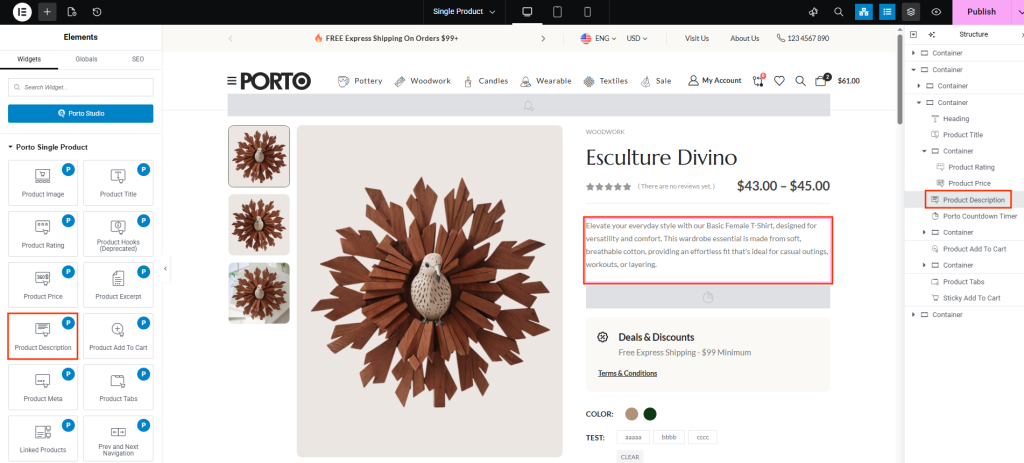
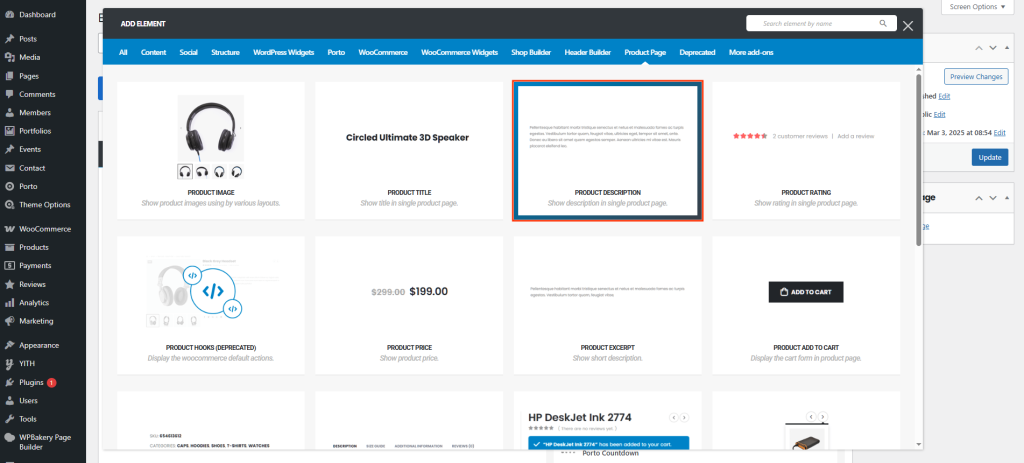
How to Use the Porto Product Description Element
-
Open Single Product Template
- Go to Porto > Template Builder > Single Product.
- Choose Elementor or WPBakery Page Builder.
-
Add the Product Description Element
- From the Porto Single Product Elements panel, drag Product Description into your desired section of the layout.
- It’s often placed below the product gallery or price section.
-
Customize the Appearance
- Access the Content or Style tab (depending on your builder).
- Adjust typography and color settings to improve readability and visual consistency.
-
Preview and Save
- Save your changes and preview a product page to verify that the description displays correctly and matches your design preferences.
Element Content Options
| Option | Description |
|---|---|
| Typography | Customize the font family, size, weight, and line height for the product description text. Helps maintain visual consistency with your store’s overall typography. |
| Color Options | Adjust the text color, link color, and hover color for the product description content. Choose contrasting colors for readability and brand coherence. |
Additional Tips
- Keep It Readable: Use comfortable line spacing and medium font weights for long product descriptions.
- Consistent Styling: Match your typography settings with the global text styles used across your website.
- Highlight Important Info: Use bold or color highlights sparingly to emphasize product features or technical specifications.
- Test on Mobile: Always check how the description appears on smaller screens for optimal user experience.
