
The Porto Product Excerpt element is part of the Porto Single Product Builder, designed to display the short description of your WooCommerce product.
This excerpt provides a quick summary or promotional highlight of the product — often shown near the title, price, or Add to Cart button — to engage customers before they scroll for more details.
With built-in typography and color controls, you can easily match the text style to your store’s visual identity without needing additional CSS.
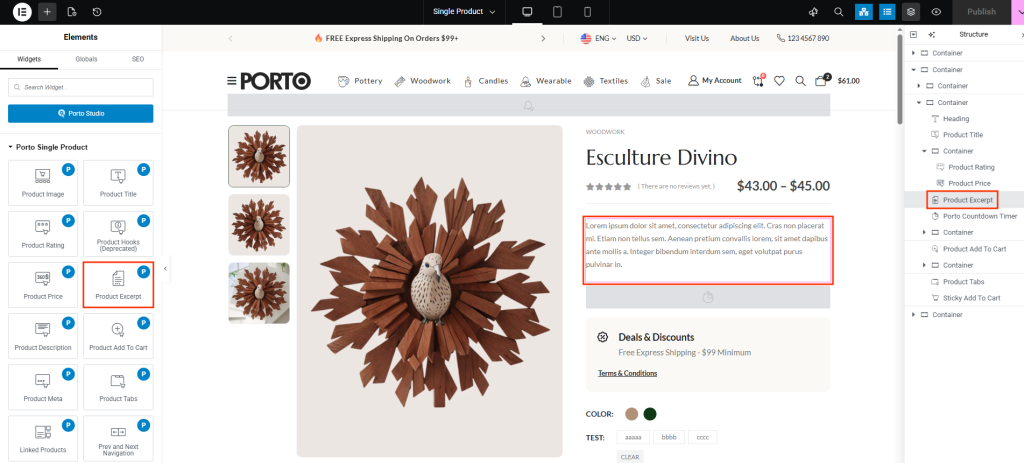
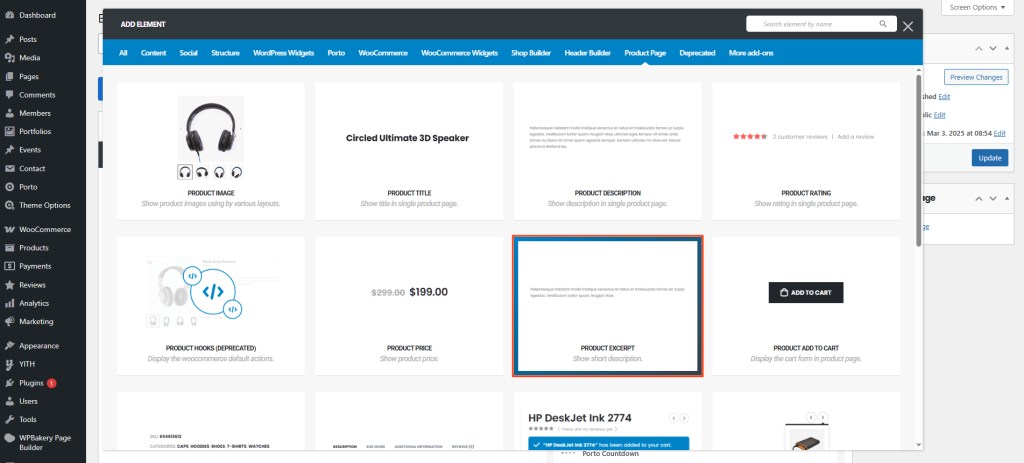
How to Use the Porto Product Excerpt Element
- Open Your Single Product Template
Go to Porto > Template Builder > Single Product and select the builder (Elementor or WPBakery). - Add the Product Excerpt Element
From the Porto Single Product Elements panel, drag and drop the Product Excerpt widget into your product layout.
Common placement is below the Product Title or above the Add to Cart section. -
Customize the Appearance
- Adjust text typography for readability and style.
- Change the color to align with your theme’s branding.
- Save and Preview
Save your changes and preview any product page to confirm that the short description displays correctly across all devices.
Element Content Options
| Option | Description |
|---|---|
| Typography | Customize font family, size, weight, line height, and letter spacing. Use this to control the overall look and hierarchy of your product excerpt. |
| Color | Define the text color for the excerpt. You can set a single color or use your theme’s global palette for consistency. |
Additional Tips
- Content Control: The excerpt text is managed in WooCommerce under the Short Description field in the product editor.
- Consistency: Keep excerpt styles consistent across all product templates for a uniform store design.
- Contrast: Ensure text color contrasts well with your background for better readability.
- Responsive Design: Preview your product excerpts on mobile and tablet to ensure text spacing and size are optimized.
