
The Porto Product Meta element is used to display essential product details such as SKU, categories, and tags on your WooCommerce single product page.
It provides flexible design options that allow you to control layout, spacing, and typography—ensuring the meta information aligns perfectly with your brand’s visual style.
You can easily adjust link colors, hover effects, and text styles to create a cohesive, professional presentation of your product data.
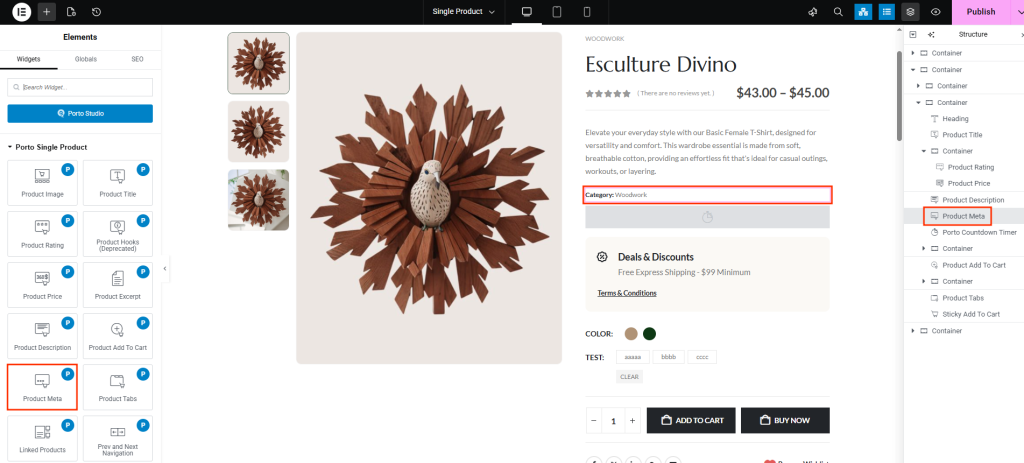
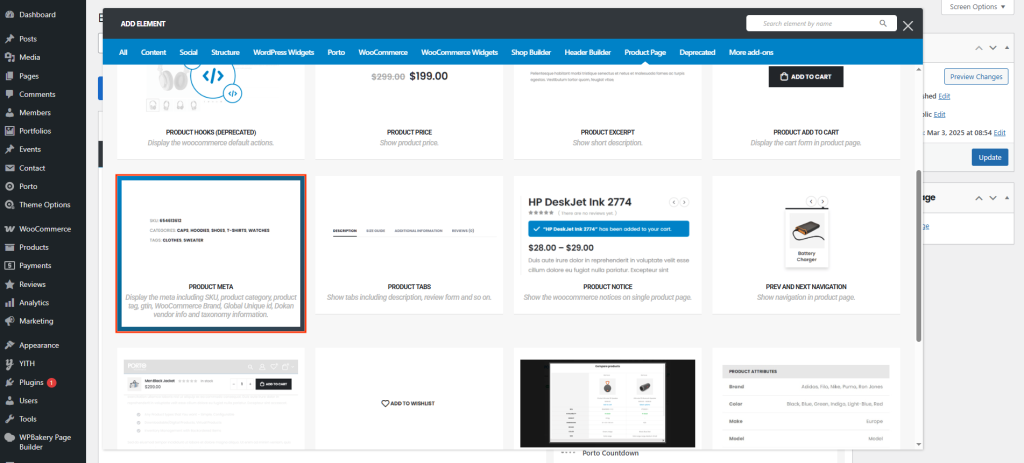
How to Use the Porto Product Meta Element
-
Open Single Product Template
- Go to Porto > Template Builder > Single Product.
- Open your desired single product template in Elementor or WPBakery Page Builder.
-
Add the Product Meta Element
- From the Porto Single Product Elements section, drag and drop the Product Meta element into your design.
- Typically placed below the product price or description section.
-
Configure the Meta Display
- In the Element Content Options, choose your preferred view mode, adjust spacing, and customize colors and typography.
- Instantly preview the result within the builder.
-
Save and Preview
- Click Save or Publish, then preview a product page to see your updated meta layout live.
Element Content Options
| Option | Description |
|---|---|
| View Mode | Select how the meta information (SKU, categories, tags) is displayed — for example, stacked vertically or inline horizontally. |
| Spacing | Adjust spacing between each meta item for improved readability and layout balance. |
| Text Color | Set the base text color for the meta labels and values. |
| Typography | Control font family, size, weight, and line height for all meta text. |
| Link Color | Choose the color for clickable links (e.g., category and tag links). |
| Link Hover Color | Define the color that appears when a user hovers over a linked meta item. |
| Link Typography | Customize the font style and appearance of linked meta text independently from the regular meta typography. |
Additional Tips
- Placement Recommendation: The Product Meta element usually appears below the Add to Cart section or near the product description for better visibility.
- Consistent Styling: Match typography and color with your store’s design system for a unified look.
- Highlight Links: Make category and tag links easily noticeable by applying a distinct hover color or bold typography.
- SEO Benefit: Displaying SKU and product categories can help search engines better understand your product structure.
