
The Porto Product Price element is a key component of the Single Product Builder that displays your WooCommerce product’s price dynamically.
It automatically reflects regular prices, sale prices, and variable product pricing based on WooCommerce data — ensuring accuracy without any manual updates.
You can also fully control the appearance of the price text, including typography, color, and old price color, to match your store’s design and branding.
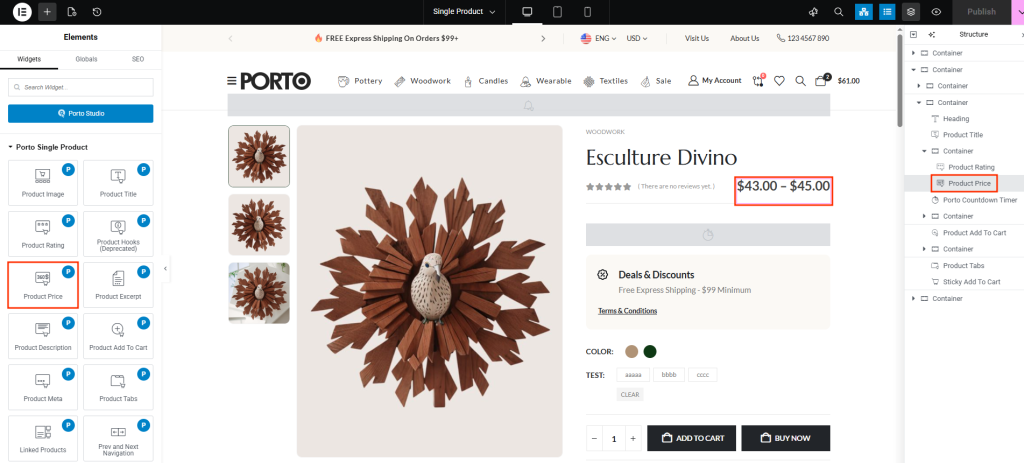
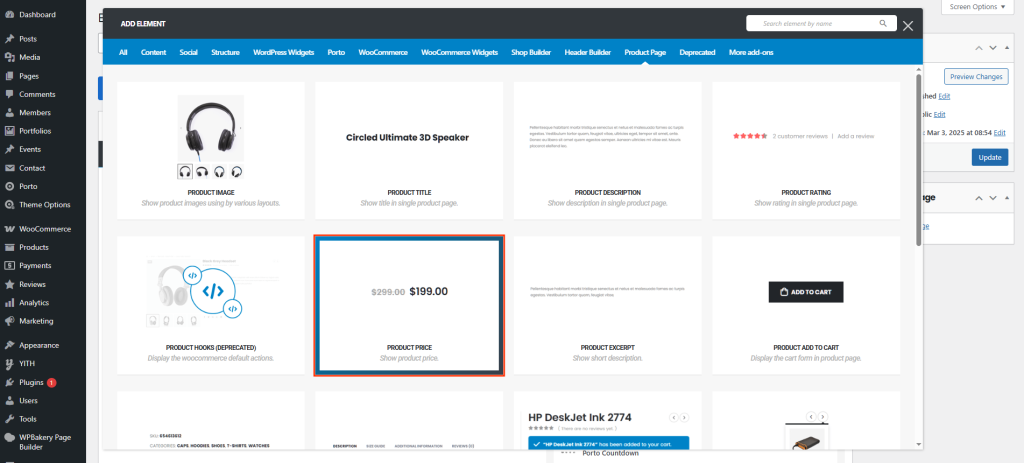
How to Use the Porto Product Price Element
-
Open Single Product Template
- Go to Porto > Template Builder > Single Product.
- Choose your preferred page builder (Elementor or WPBakery).
-
Add the Product Price Element
- From the Porto Single Product Elements list, drag the Product Price element into your desired section.
- Place it near the title or Add to Cart button for best layout flow.
-
Customize Appearance
- In the element settings panel, adjust Typography, Color, and Old Price Color to match your theme.
- You can also pair this element with others (like Product Title or Product Excerpt) for a complete layout.
-
Preview and Save
- Save your changes and preview the product page to ensure the price displays correctly across all devices.
Element Content Options
| Option | Description |
|---|---|
| Typography | Customize font family, size, weight, letter spacing, and alignment for the product price text. |
| Color | Choose the primary color for the current product price. Ideal for matching your brand color scheme. |
| Old Price Color | Set a distinct color for the crossed-out price (used when a product is on sale). Helps visually emphasize discounts. |
Additional Tips
- Dynamic Updates: Prices automatically update for sales, variations, and discounts — no manual edits needed.
- Visual Emphasis: Combine bright or bold price colors with clear typography to draw attention to offers.
- Consistent Styling: Use the same typography style for all price elements across your site for a cohesive design.
- Contrast: Ensure the price color has enough contrast with the background for better readability.
