
The Porto Product Title element displays the main product name on your single product page. As one of the essential elements in the Porto Single Product Builder, it helps ensure your product titles are visually appealing, semantically correct, and consistent with your overall site design.
This element gives you control over title tag hierarchy (H1–H6, DIV, p), typography settings, and color customization, enabling full flexibility in aligning your product titles with your brand style and SEO structure.
How to Use the Porto Product Title Element
-
Open Single Product Template
- Go to Porto > Template Builder > Single Product.
- Open the template using Elementor or WPBakery Page Builder.
-
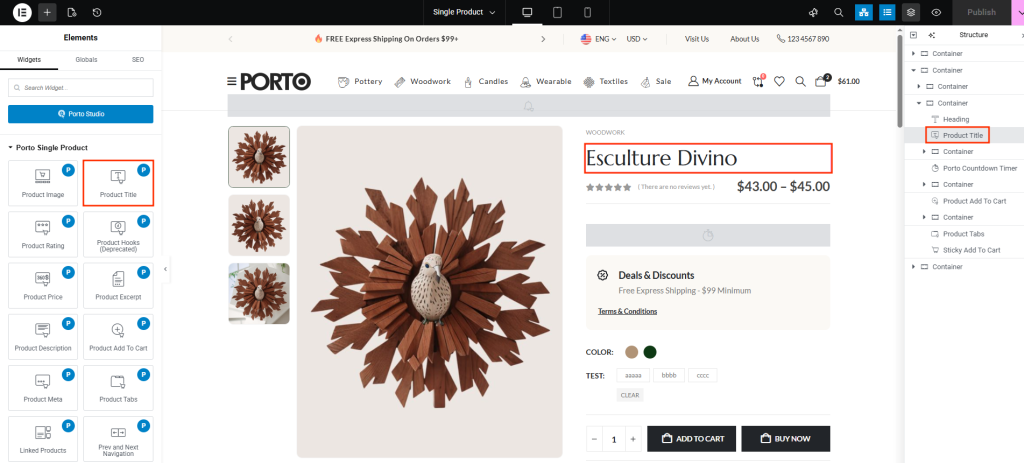
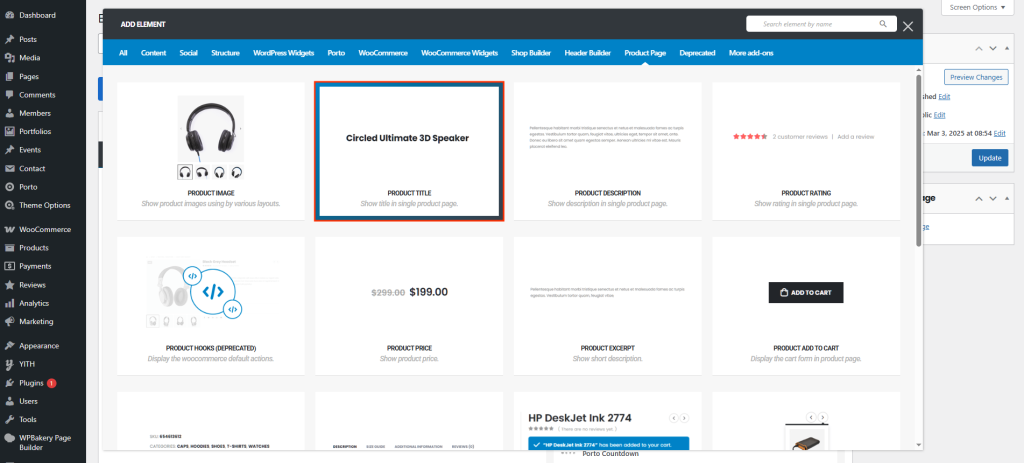
Add the Product Title Element
- From the Porto Single Product Elements section, drag Product Title into your desired location (typically above the price or product image).
-
Configure Title Options
- In the element settings, select your preferred Title Tag (e.g., H1 or H2).
- Adjust typography and color settings to match your store’s style.
-
Save and Preview
- Save your changes, then preview your single product page to ensure the title displays correctly on all devices.
Element Content Options
| Option | Description |
|---|---|
| Title Tag | Choose the HTML heading tag for the product title (H1~H6, DIV, p). For SEO purposes, H1 is recommended for main product titles. |
| Typography | Customize the font family, weight, size, and spacing of the product title. This helps maintain brand consistency and readability. |
| Color | Set the text color for the product title. You can use theme default colors or specify a custom value to highlight titles. |
Additional Tips
- Typography Harmony: Match your product title typography with your site’s overall heading style for design consistency.
- Responsive Adjustments: Test your title size and line spacing on mobile and tablet for optimal readability.
- Visual Hierarchy: Combine the Product Title element with the Product Price and Product Rating elements for a professional product header section.
- Color Contrast: Ensure sufficient contrast between title color and background to improve visibility and accessibility.
