
The Porto Sort By element allows you to display a customizable sorting dropdown on your product archive or shop pages. This control lets users reorder products by criteria such as popularity, rating, date, or price.
The element is available in both Elementor and WPBakery, but in WPBakery it must be placed inside the Porto Tool Box element, while in Elementor it can be added directly to the layout.
With extensive styling options—including label visibility, typography, spacing, and select box design—you can fully match the sorting UI to your shop’s visual style.

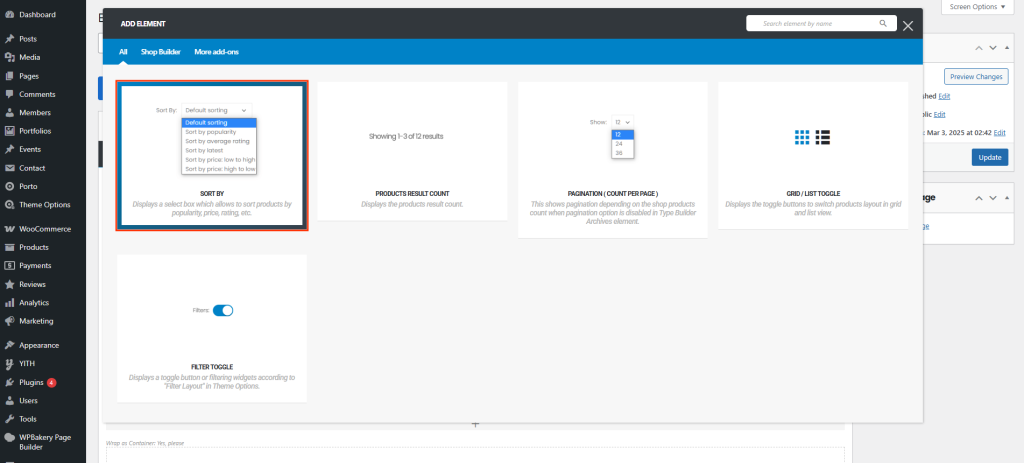
How to Use the Porto Sort By Element
WPBakery Page Builder
- Edit your Product Archive template.
- Add the Porto Tool Box element.
- Inside the Tool Box, insert the Sort By element.
- Configure styling options as needed.
Elementor Page Builder
- Edit your Product Archive template in Porto Template Builder.
- Drag the Sort By widget directly into your desired section.
- Adjust the appearance using the available options.
Element Content Options
| Option | Description |
|---|---|
| Label Visibility | Show or hide the “Sort By” label next to the dropdown selector. |
| Label Color | Customize the text color of the label. |
| Label Typography | Set font family, size, weight, and style for the label. |
| Select Box Color | Choose the text or UI color of the dropdown/select field. |
| Select Box Typography | Control the font style and readability of the select field items. |
| Padding | Add inner spacing inside the dropdown for better UI balance. |
| Spacing | Add outer spacing to create room between the Sort By element and surrounding elements. |
| Select Height | Adjust the height of the dropdown selector to fit your design. |
Additional Tips
- For WPBakery layouts, ensure the Sort By element is always inside the Porto Tool Box, or it will not render correctly.
- Combine Sort By with Result Count, Pagination(Counts Per Page), and Grid/List Toggle for a complete product handling toolbar.
- If you use horizontal filter layouts, place the Sort By element where it complements the layout structure (often right-aligned).
- Keep typography consistent with your theme to maintain a clean and professional shop UI.
