
The Porto Sticky Add to Cart element ensures that your product’s essential purchase actions remain visible at all times — even while scrolling.
This element helps boost conversions by keeping the Add to Cart button, product title, price, rating, and availability information accessible without requiring users to scroll back to the top.
It is highly customizable, allowing you to control layout position, typography, colors, spacing, and responsive visibility (including mobile behavior).
Note: To use the Sticky Add To Cart, you should add Product Add To Cart element first.
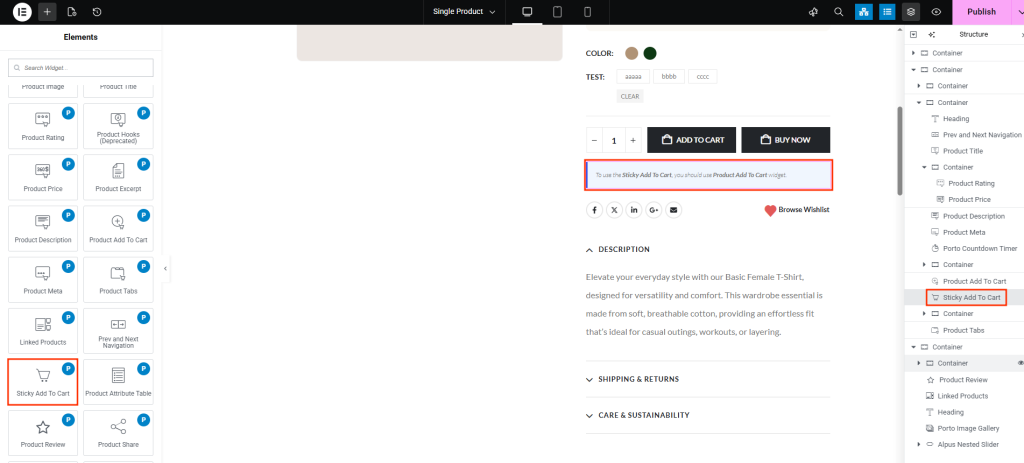
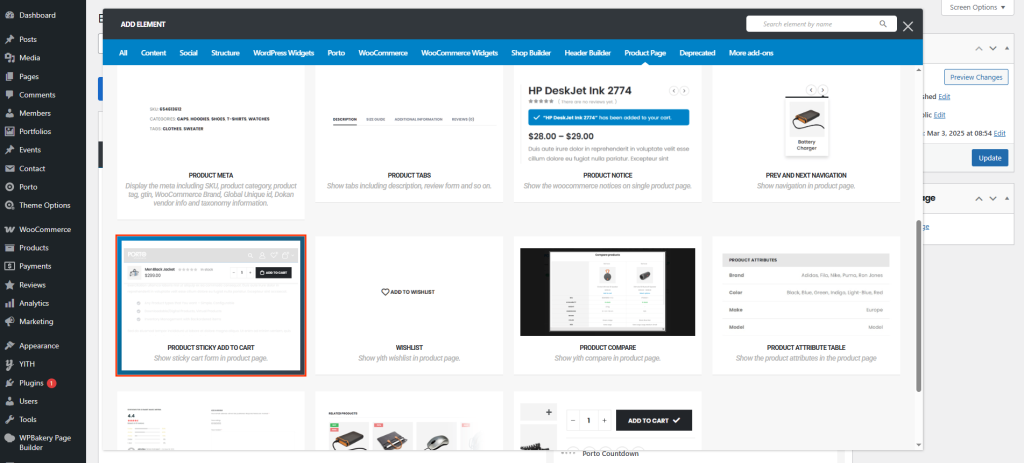
How to Use the Porto Sticky Add to Cart Element
-
Open Single Product Template
- Go to Porto > Template Builder > Single Product.
- Open your single product layout using Elementor or WPBakery.
-
Add the Sticky Add to Cart Element
- From the Porto Single Product Elements panel, drag the Sticky Add to Cart element into your layout.
- Place it near the bottom section of your template for consistent visibility.
-
Configure Appearance and Behavior
- In the element settings, customize typography, colors, and alignment.
- Enable or disable sticky behavior on mobile devices as needed.
-
Save and Preview
- Save the template and preview it on a product page.
- Test scroll behavior across desktop and mobile devices to confirm smooth functionality.
Element Content Options
| Option | Description |
|---|---|
| Position | Sets the location of the sticky bar (Top or Bottom of the screen). |
| Enable Sticky on Mobile | Toggles sticky functionality on mobile devices. |
| Title Tag | Defines the HTML tag for the product title (e.g., H1, H2, H3). |
| Product Title Typography | Controls font family, size, weight, and style for the product title. |
| Product Title Color | Sets the color of the product title text. |
| Product Price Typography | Controls font family, size, and weight for the product price. |
| Product Price Color | Sets the color of the product price text. |
| Rating Size | Defines the size of the product rating stars. |
| Rating Margin | Controls spacing around the rating stars for better alignment. |
| Availability Font | Adjusts the font family and style for the product availability text. |
| Availability Margin | Sets spacing between availability text and surrounding elements. |
| Availability Color | Defines the text color for stock availability (e.g., In Stock, Out of Stock). |
| Button Font | Controls typography for the Add to Cart button text. |
| Button Padding | Sets internal spacing around button text for optimal click area. |
| Button Height | Defines the vertical height of the Add to Cart button. |
Additional Tips
- Mobile Optimization: If your layout feels too crowded on smaller screens, disable the sticky bar on mobile for a cleaner user experience.
- Brand Consistency: Match button colors and typography with your site’s primary design palette.
- Performance Note: Keep image-heavy or animation-heavy elements out of the sticky bar to maintain smooth scrolling.
- Testing: Always preview sticky behavior on multiple devices and browsers to ensure seamless alignment and positioning.
