
The Woo Price element is a dynamic pricing block used inside the Porto Post Type Builder to display the product’s price within custom product card layouts. It automatically pulls the regular price, sale price, and price range (if variations exist) directly from WooCommerce. The element requires no manual input—pricing is always updated based on the product associated with each loop item.
This widget is commonly used in product grids, sliders, category listings, related products, and archive item layouts.
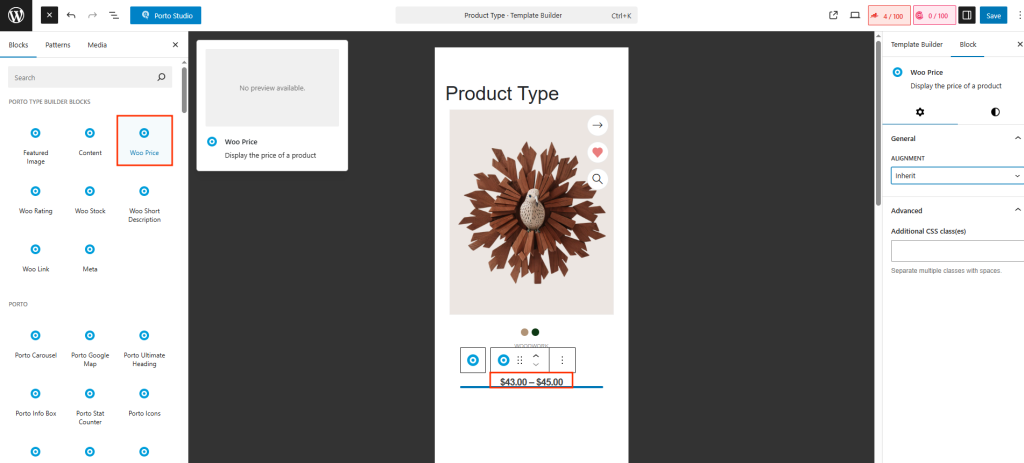
How to Use the Woo Price Element
- Open Porto → Template Builder → Post Type.
- Create or edit a Post Type Block used for products.
- Click the “+” Add Block button to open the block library.
- Select Woo Price from the Porto widget list.
- Position it using drag-and-drop or the Document Overview panel.
- Adjust alignment or add custom styling in the block settings panel.
- Save and publish your Post Type Block.
- Assign this block inside any Porto product grid or archive layout.
Element Content Options
-
Content Display Type
Choose how the price text should be aligned within the block:
- Inherit – Uses alignment from the parent container or typography settings.
- Left – Aligns price to the left of the block.
- Center – Centers the price horizontally.
- Right – Aligns price to the right.
- Justify – Stretches text to fill the entire width (rarely used for price but available).
Center is often used in minimal product cards and sliders, while “Left” works best for standard shop grids.
-
Additional Custom CSS Fields
The widget includes extra fields for Custom CSS class, Custom CSS ID, Inline style input. This is useful when You need targeted styling, You want to animate individual image blocks, You integrate the element into advanced CSS frameworks.
Best Practices
- Place Woo Price near Woo Rating, Woo Short Description, or Woo Link for complete product cards.
- For sale products, Porto automatically shows the strike-through regular price + highlighted sale price.
- Use centered alignment for modern card layouts; left alignment for shop-style grids.
- Add extra spacing or line-height using the CSS field to differentiate pricing visually.
