
The Woo Stock element in the Porto Post Type Builder displays the dynamic stock status of a WooCommerce product inside a custom post item layout. It retrieves real-time availability information—such as In Stock, Out of Stock, or Available on Backorder—based on the product’s inventory settings in WooCommerce.
This element is commonly used in custom product card layouts, product grids, archive layouts, and related product sections, ensuring customers can see availability before opening the product page.
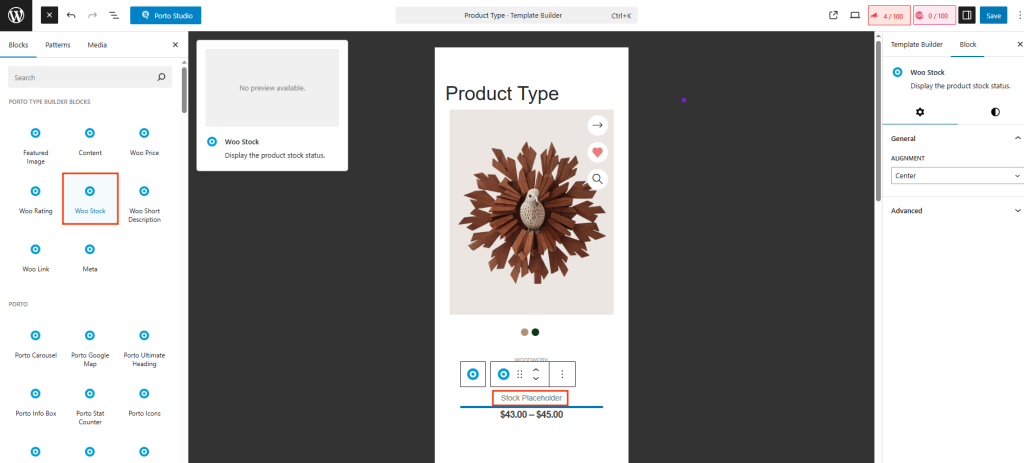
How to Use the Woo Stock Element
- Open Porto > Template Builder > Post Type.
- Edit your Post Type Block for Products.
- Click the “+” Add Block button in the top-left.
- Select Woo Stock from the Porto widget list.
Element Content Options
-
Alignment
Controls how the stock status text is aligned within the block. This setting is useful when designing tightly structured product cards where stock labels must align consistently with other elements like price or buttons.
-
Additional Custom CSS Fields
The widget includes extra fields for Custom CSS class, Custom CSS ID, Inline style input. This is useful when You need targeted styling, You want to animate individual image blocks, You integrate the element into advanced CSS frameworks.
Why Use the Woo Stock Element
- Ensures consistent stock visibility across all custom layouts
- Promotes user trust by showing availability upfront
- Works automatically with WooCommerce inventory management
- Allows flexible design placement unlike default theme templates
- Helps reduce bounce rate for out-of-stock products
