
Shop Catalog Mode in Porto allows you to display WooCommerce products without enabling direct purchasing. This mode transforms your store into a browse-only product catalog, giving you precise control over which users can see prices and which shopping features are visible. It is especially useful for wholesale catalogs, B2B websites, quotation-based stores, or product showcases.
In Porto → Theme Options → WooCommerce → Catalog Mode, You can do all Catalog Mode–related controls.
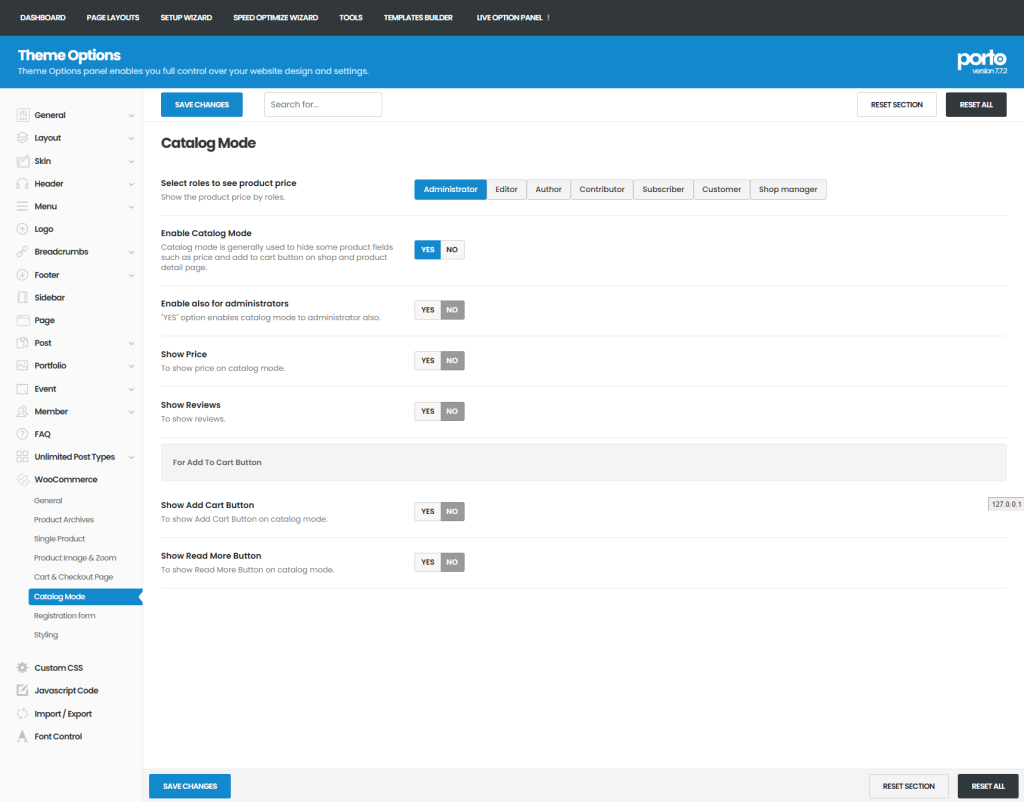
Main Settings
- Enable Catalog Mode
- Activates catalog-only behavior for the shop.
- Select Roles to See Product Price
- Choose which user roles are allowed to view product prices.
- Users not included will see products without pricing.
Additional Settings (Visible After Enabling Catalog Mode)
- Administrator Scope
- Enable Also for Administrators - Applies Catalog Mode rules to administrator accounts.
- Product Information Display
- Show Price – Toggle product price visibility
- Show Reviews – Toggle reviews and ratings visibility
- Action Buttons
- Show Add to Cart Button – Enable or disable purchasing actions
- Show Read More Button – Control visibility of the Read More button

