
The Woo Short Description element is a dynamic Porto widget used to display the WooCommerce product’s short description within custom product card layouts. This field pulls directly from the Product → Short Description section inside WooCommerce, making it ideal for grids, carousels, category listings, and any post loop where you need a concise summary of the product.
It is frequently used in minimal product cards or quick-shop layouts where full content is unnecessary.
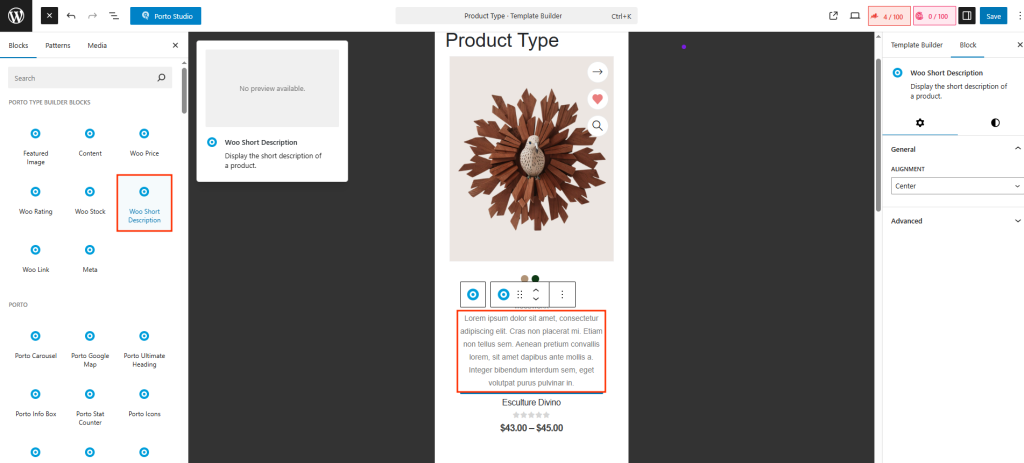
How to Use the Woo Short Description Element
- Open Porto → Template Builder → Post Type Builder.
- Edit or create a new Post Type Block for WooCommerce products.
- In the top-left corner of the editor, click the “+” Add Block icon.
- From the widget list, select Woo Short Description.
- The block will appear on your canvas and inside the Document Overview panel.
- You can drag and reposition it to control where the short description appears (above price, below title, inside a section, etc.).
The content will automatically update for each product when used inside Porto grids or archive layouts.
Element Content Options
-
Alignment
Choose how the text should be aligned inside the product card: Inherit, Left, Center, Right, Justify. These options help ensure your layout matches your overall product card style.
-
Additional Custom CSS Fields
The widget includes extra fields for Custom CSS class, Custom CSS ID, Inline style input. This is useful when You need targeted styling, You want to animate individual image blocks, You integrate the element into advanced CSS frameworks.
Why Use Woo Short Description?
- Ideal for clean, minimal product cards
- Provides quick scanning of product features or value
- Helps maintain consistent text length across grid items
- Improves readability in archive and category listings
- Fully dynamic — no need to edit templates or duplicate content
