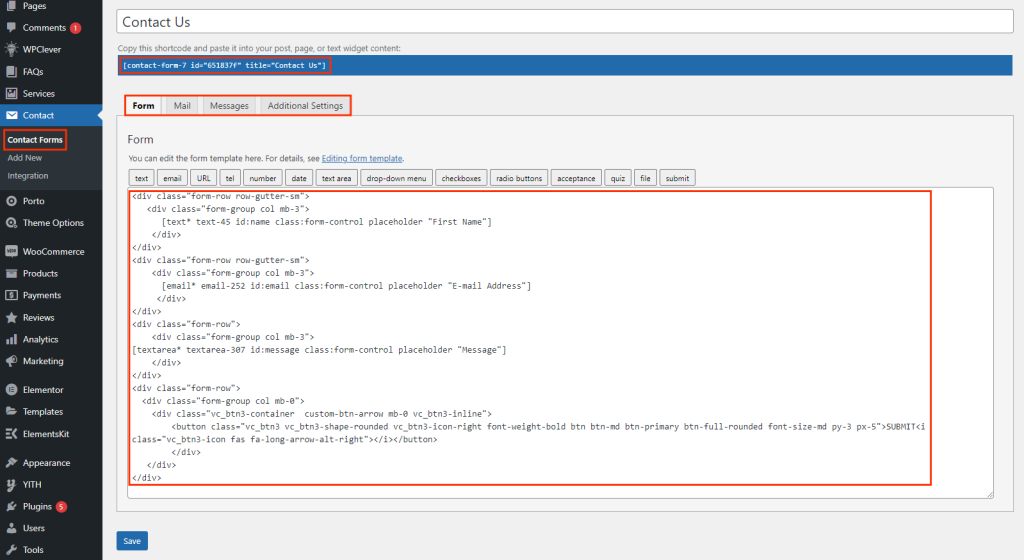
If you haven’t yet installed our demo content and would like to add a contact form to your website, we recommend using one of the most popular plugins for creating custom forms: Contact Form 7 or WPForms. Both plugins come as recommended tools with the Porto theme, ensuring seamless integration and ease of use.
Why Choose These Plugins?
- Contact Form 7: A flexible, free plugin that offers a wide range of customization options and powerful features for creating any kind of form.
- WPForms: A beginner-friendly, drag-and-drop form builder that helps you create professional forms in minutes with less effort.
How to Add the Contact Form
- Install and Activate the Plugin
First, install and activate either Contact Form 7 or WPForms from your WordPress dashboard. Once activated, you’ll automatically have access to a basic contact form, which you can easily customize. - Create Your Custom Contact Form
- For Contact Form 7: Navigate to Admin > Contact > Add New and design your custom form. You can modify the default form fields or add new ones based on your needs. Once created, copy the shortcode.
- For WPForms: Navigate to WPForms > Add New to create your contact form using the drag-and-drop builder. Customize it with additional fields, styling, and advanced options.
- Place the Contact Form on Your Page
After creating your form, you can place it on any page using the following methods:- Using Shortcodes: Both Contact Form 7 and WPForms generate a unique shortcode after form creation. Simply copy the shortcode and paste it into your page content area using the WordPress block editor, WPBakery Page Builder, or Elementor.
- Using Porto Contact Form Widget: Porto theme offers a custom Contact Form Widget, which makes it easy to add the form directly into your page layout. Just drag and drop the widget into your desired section.
- Design and Style the Form
Whether you’re using WPBakery Page Builder or Elementor, you can customize the design and positioning of the form to fit your website’s look and feel. Porto’s compatibility with both builders makes this process intuitive, giving you full control over the layout and appearance of the contact form.
Benefits of Using Porto’s Contact Form
- Seamless Integration: The Porto theme integrates effortlessly with Contact Form 7 and WPForms, ensuring your forms look great on any page without additional configuration.
- Customization Flexibility: Customize both the form content and the layout to suit your branding. Porto’s compatibility with popular page builders like Elementor and WPBakery ensures that you can design beautiful, functional forms with ease.
- Enhanced User Experience: Adding a contact form increases the interactivity of your site, enabling users to easily get in touch with you, enhancing customer engagement and support.
Whether you're creating a basic contact form or a complex custom form, Porto’s compatibility with Contact Form 7 and WPForms ensures that you can easily add functional forms to your website. Take full advantage of Porto’s customization options and form-building flexibility to provide your visitors with an intuitive, user-friendly way to contact you.